Connection Settings
The connection settings are configured in the connection dialog of the Config UI for the estos ECSTA for Avaya IP Office.
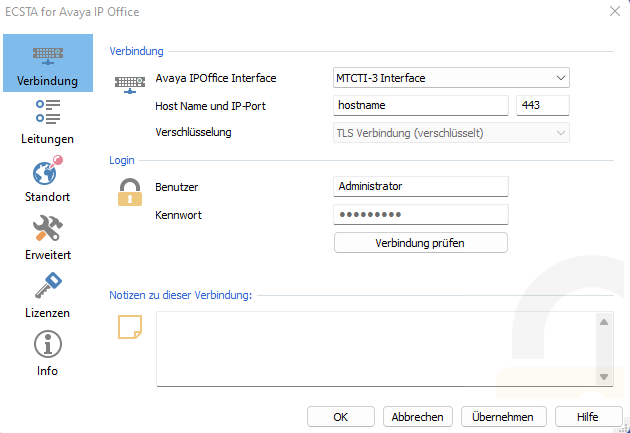
Configure connection data
Enter the connection data (interface, host name, IP port, encryption) in order to communicate directly with Avaya IP Office via the "Avaya MTCTI-3 Interface" or via the interface of the "Avaya One-X Portal Process " to set up Avaya IP Office.
Avaya IP Office Interface
You can use this drop-down box to specify whether the estos ECSTA for Avaya IP Office should be connected to the Avaya IP Office directly via the "Avaya MTCTI-3 Interface" or via the interface of the "Avaya One-X Portal Process". If you have an existing installation for the "One-X Portal Interface" or no installation at all for the connection to the Avaya IP Office, the "One-X Portal Interface" is specified. Select the "MTCTI-3 Interface" if you want to install it and click on "Apply".
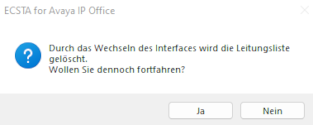
A message appears that the line list will be deleted. A line list read in by the "One-X Portal Interface" cannot be used by the other interface and vice versa. Because they are managed differently depending on the interface. Therefore click on "Yes" in the dialog.
Host name
Depending on the interface that you have selected to connect the estos ECSTA for Avaya IP Office to the Avaya IP Office, you must either enter the name of the server on which the Avaya IP Office is installed or the name or the IP address of the server on which the "Avaya One-X Portal Process" is running.
Portnumber
Depending on the interface that you have selected to connect the estos ECSTA for Avaya IP Office to the Avaya IP Office, you must either specify the port number on which the estos ECSTA for Avaya IP Office has access to the Avaya "MTCTI-3 interface" (default: 443) or access to the " Avaya One-X Portal Interface" (default: 9443 or 8080).
Encryption
The type of data encryption between estos ECSTA for Avaya IP Office and the interface you specified. With the "Avaya MTCTI-3 Interface", communication always takes place via a TLS-encrypted connection. With the Avaya One-X Portal Interface you can choose between unencrypted or TLS-encrypted.
Login
Enter the access data (username / password) of the administrator account as configured in the Avaya One-X Portal application or in the "Avaya IP Office".
Check connection
You can test whether you can establish a connection to the selected interface "Avaya One-X Portal Interface" or "MTCTI-3 Interface" with the connection and access data.
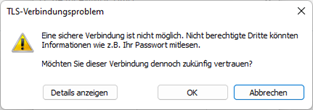
When installing the "MTCTI-3 Interface" for the first time, a TLS connection problem can occur during the connection test because the TLS connection is initially classified as untrustworthy. A corresponding dialog is displayed in which the administrator can use the OK button to specify that this TLS connection is to be classified as trustworthy from now on.
Comments for this connection
Here you can enter comments, notes and the like.
Version 7.0